Before I fell in love with Twilight I was a Pride & Prejudice fan. I've come out of blogging hiatus to tell you about the latest iPad app I like.
Want a good way to introduce Shakespeare or Austen to your little one?
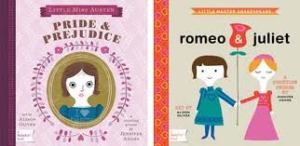
Enter new BabyLit books - available in board book and iPad/iPhone enhanced versions.
I bought the board books first at my local Indigo store and thought it was super cute. It prompted my 8 year old son to spend half an hour asking me about Pride & Prejudice. You know when your child is enraptured by your explanation of why Lizzie won't marry Mr. Collins that this new book has done its job.

The iPad enhanced version is even better. This is a counting book so it's like any other baby iPad book that counts objects except this time they are marriage proposals and ballgowns. Bonuses - you can dress Lizzie in different ballgowns and that the whole first chapter of P&P is narrated at the end for you.
My son has yet to listen to the narrated first chapter of P&P that is on the iPad but it's nice that one day he may stumble upon it.
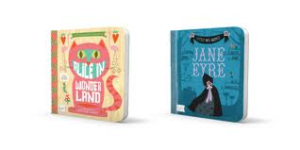
More titles coming up? Romeo & Juliet is already available but it looks like Jane Eyre and Alice in Wonderland are coming soon.
-
 Recently I did a search for "Disney CME" and couldn't find a comprehensive listing anywhere. So I decided to create one for 20...
 -
Hey everyone, I just fell in love with a new story - it just finished and guess what? It's going to be pulled on October 1st from fanf...
-
Rob's fingers inspire me By the way all the sheet music below is listed on my Sheet Music page for this blog. I've also include...
-
You all know I love Carter Burwell's Twilight songs because they are so friendly for us amateur pianists. Here's the latest theme ...
-
 While making a card this weekend I was in the search for a good Cricut stencil font I realized there was no comprehensive list. So I made on...
 -
 So last month I posted that I wasn't sure if I should go to the Official Twilight Convention Tour or TwiTour for short. I can't...
 -
For all of my friends and family who are potentially reading this, there may be too much information for you in this post. It's emotion...
-
 So you know how in the movie Julie & Julia the woman bakes her way through Julia Child's cookbook Mastering the Art of French Cooki...
 -
 Hydraulic Level 5 by Gondolier I'm really an indoor girl. I don't do extreme sports. I live at the bottom of a ski hill and hav...
 -
I finally got the chance to see La La Land and absolutely loved it. Not just because I have loved Ryan Gosling since The Notebook but becaus...
Follow Me Also At


Popular Posts

Grab My Button


cross posted with Twi-Mobile
Want a new gorgeous way to catch up on Twitter, Facebook, and blogs all in one place on your iPad for free?
Up until tonight I've been using the Twitter, Facebook, and Google Reader to catch up on all my favourite people and blogs.
I thought those were adequate but boring.
Enter Flipboard - voted #1 app for iPad in iTunes. It puts your Facebook, Twitter, and blog/RSS news feeds all in one place.

My Twitter feed on Twitter app


You can also post to Twitter and Facebook from Flipboard. You can attach photos or link to the page you're surfing. Very easy.

Let me know what you think - it's free so no harm in trying - here's the itunes link. Note there is no iPhone version of this and not sure if there will be in future.
By the way, have you guys figured out I'm trying to avoid turning on my computer ever again and just living off my iPad? I did this whole post on Blogpress using screen caps from the iPad. Love it!
Ever wish you took better pictures when you were in Forks? Never had the chance to go but would love to pay $0.99 to live vicariously? Wish you had nice enough Twilight photos for high quality wallpaper on your iPad or iPhone?

I got a lovely email the other day letting me know about this cool Alone in Forks iPad app. Went to check it out from my iPhone 3GS but didn't want to update my software. So I installed the app on my iPad but I'm sure it looks as good on the iPhone.

It has a vast collection of pictures from Forks, La Push, Port Angeles, and also Twilight filming locations in Portland taken by the talented photographer Angel Abreu of Majic Moments Photography.
Here's a sample of some of the pictures. With the installed app they come in hi res so it makes for beautiful wallpaper.


Not only are there lovely pictures but they are also geotagged which means you can see exactly where they were taken on GoogleMaps. Especially good if you are driving around doing your Twilight tour in Forks or Portland and trying to find a specific location.

What are they missing? I didn't see any pics from Canada but I can't blame them for not coming up North of the border. Maybe that will be added in an update later on.
Go ahead and check them out in the iTunes app store.
(for those of you subscribed to both - please forgive the cross-posting of this to my regular blog Twilight, Travel, and Treats)
Do you ever get the inspiration to post something while you're out and about? Up until recently I'd just wait until I got home and hope I'd still remember my ideas. Well for $2.99 I've found a good way to get those ideas out onto the page before I forget.

Blogpress is available for iPod/iPhone/iPad. It is very flexible and you can blog across many platforms
These are the blogging platforms it supports

Also Tumblr and SquareSpace
Pros
- you can write a post and have it posted across multiple blogs
- can insert photos or videos from your iPhone - great if you're posting photos taken on your iPhone
- can save either to a local draft, online draft, or post immediately
- you can save photos you've posted to Flickr, Picasa, or another album associated with your blog
- you can save videos to your Youtube account
- you can post your location and connect up with your Twitter or Facebook accounts.
Cons
- a bug - when I try and switch to HTML mode the app closes - right now I can't do any HTML changes (fonts, links, etc)
- another bug - when I choose to post immediately it just saves as an online draft
Update - Blogpress on my iPad has been bugless so far. The HTML works well and it's easy to add formatting and links.
Also the inability to publish straight from the phone is my silliness - when you click the i next to the post title you can add labels etc but there is also a Publish selector at the bottom that I hadn't noticed.
Let me know if you've found any other useful blogging apps. I use the wordpress and tumblr ones and may review those ones next but they're free so it's easy just to try them out.
More screencaps